2015年4月12日 星期日

Minnowboard 相關資料收集

前幾天Papa參加WinHec於Line中跟我提及“Minnowboard“,覺得有點好奇,就上網查了下資料,將查到的資料做了下記錄。
無緣參加WinHEC,也沒能拿到MinnowBoard Max, 真是有夠他媽的幹.......
不過還是要稍微了解一下這是啥東西,這樣才不會被別人呼弄了.......
在看完後,還真的覺得沒什麼,又貴又難用,沒有甚麼理由一定要用它,若花時間玩它,感覺有點浪費生命.....


可運行windows 8.1及android,linux


Windows


Get Started: http://aka.ms/winhec/devboards
Support: http://aka.ms/winhec/support
Contact: WinHardwareDevBoard@nicrosoft.com


为了应对竞争对手的不断冲击,英特尔发布了支持 Linux 和 Android 的单板计算机 MinnowBoard Max,售价 99 美元。该开发板在硬件上采用 1.91GHz 主频的 Atom E3845 处理器,另外它的软件是完全开源的,你可以在这里查看 适配的固件和软件 。
MinnowBoard Max 的电路图也开放了自由下载,它的图形芯片组驱动程序也采取开源政策,用户可以自行修改。MinnowBoard Max 与树莓派(Raspberry Pi)不属于直接竞争对手,前者是为那些喜欢折腾 x86 架构系统的 DIY 爱好者准备的,后者更接近于教育工具。后者的生态系统已经非常强大,不过前者也有名为 Lure 的附加组件以扩展功能。
英特尔进入单板机领域的原因大概就是他们长时间以来的缺席。目前最受欢迎的单板机树莓派采用了 Broadcomm 公司 ARM 架构的 700MHz 系统芯片,而 Minnowboard 则将英特尔的低功耗 Atom 处理器重新带到开发者面前,使英特尔在这个领域站住脚跟(至少这是他们的目标)。


TI TPS65982

參考如下連結:
http://www.ti.com/product/TPS65982/datasheet


Features

  • USB Power Delivery (PD) Controller
    • Mode Configuration for Provider (Host), Consumer (Device), or Consumer-Provider
    • Bi-Phase Marked Encoding/Decoding (BMC)
    • Physical Layer (PHY) Protocol
    • Policy Manager
    • Configurable at Boot and Host-Controlled
  • USB Type-C Specification 1.1 Compliance
    • Attach of USB Cable at Port
    • Cable Orientation and Role Detection
    • Assign CC and VCONN Pins
    • Advertise 1.5 A or 3 A for Type-C Power
  • Port Power Switch
    • 5-V, 3-A Switch to VBUS for Type-C Power
    • 5- to 20-V, 3-A Bidirectional Switch to or from VBUS for USB PD Power
    • 5-V, 600-mA Switches for VCONN
    • Over-Current Limiter, Overvoltage Protector
    • Slew Rate Control
    • Hard Reset Support
  • Port Data Multiplexer
    • USB 2.0 HS Data, UART Data, and Low Speed Endpoint
    • Auxiliary and Alternate Modes (DisplayPort and Vendor-Defined Modes)
  • Power Management
    • Gate Control and Current Sense for External 5- to 20-V, 5-A NMOS FET Bidirectional Switch
    • Power Supply from 3.3-V, 5-V, or VBUS Source
    • 3.3-V LDO Output for Dead Battery Support
  • BGA MicroStar Junior Package
    • 0.5-mm Pitch
    • Through-Hole Via Compatible for All Pins

Applications

  • Notebook Computers
  • Tablets and Ultrabooks
  • Docking Systems
  • DisplayPort and HDMI Dongles & Cables
  • Charger Adapters
  • USB PD Hosts, Devices, and Dual-Role Ports
  • USB PD-Enabled Bus-Powered Devices

Description

The TPS65982 is a stand-alone USB Type-C & PD controller providing cable plug and orientation detection at the USB Type-C connector. Upon cable detection, the TPS65982 communicates on the CC wire using the USB Power Delivery (PD) protocol. When cable detection and USB PD negotiation are complete, the TPS65982 enables the appropriate power path and configures alternate mode settings for internal and (optional) external multiplexers.
The mixed-signal front end on the CC pins advertises 1.5 A or 3 A for Type-C power providers, detects a plug event and determines the USB Type-C cable orientation, and autonomously negotiates USB PD contracts by adhering to the specified bi-phase marked coding (BMC) and physical layer (PHY) protocol.
The port power switch can pass up to 3 A downstream at 5 V for legacy and Type-C USB power. An additional bidirectional switch path can provide USB PD power up to 3 A at a maximum of 20 V as either a provider (host), consumer (device), or provider-consumer.
The TPS65982 can also be a Downstream-Facing Port (DFP), Upstream-Facing Port (UFP), or Dual-Role Port (DRP) for data. The port data multiplexer can pass data to or from the top or bottom D+/D- signal pair at the port for USB 2.0 HS or UART and has a USB 2.0 Low Speed Endpoint. Additionally, the Sideband Use (SBU) signal pair is used for auxiliary or alternate modes of communication (DisplayPort or vendor-defined modes, for example).
The power management circuitry can utilize a 3.3-V or 5-V power supply inside the system, and also use VBUS to start up and negotiate power for a dead battery or no battery condition.


TPS65982 pg1_slvsd02.gif

16.0 I2C Interface
 The TPS65982 has three I2C interface ports. I2C Port 1 is comprised of the I2C_SDA1,
 I2C_SCL1, and I2C_INT1 pins. I2C Port 2 is comprised of the I2C_SDA2, I2C_SCL2, and
 I2C_INT2 pins. These interfaces provide general status information about the TPS65982, as
 well as the ability to control the TPS65982 behavior, as well as providing information about
 connections detected at the USB-C receptacle and supporting communications to/from a
 connected device and/or cable supporting BMC USB-PD. The third port is comprised of the
 DEBUG_CTL1 and DEBUG_CTL2 pins. This third port is always a master and has no
 interrupt. This port is intended to master another device that has simple control based on mode
 and mux orientation. The first two ports can be a master or a slave, but the default behavior is
 to be a slave. Port 1 and Port 2 are interchangeable. Each port operates the same way and
 has the same access in and out of the core. An interrupt mask is set for each that determines
 what events are interrupted on that given port.

16.3 I2C Address Setting


2015年4月9日 星期四

NodeMCU - NTP Client


今天想到要利用NTP Server 來 Sync 時間 , 搜尋了一下,找到了這個連結 ........


ntp.lua 內容如下:

-- -----------------------------------------------------------------------------------
-- for a continuous run:
-- TIME=loadfile("ntp.lua")()
-- TIME:run(timer,updateinterval,syncinterval,[ntp-server])
-- TIME.hour TIME.minute TIME.second are updated every 'updateinterval'-seconds
-- NTP-server is queried every 'syncinterval'-seconds
--
-- a one-time run:
-- ntprun=loadfile("ntp.lua")
-- ntprun():sync(function(T) print(T:show_time()) end)
--
-- config:
-- choose a timer for udptimer
-- choose a timeout for udptimeout 
--    timer-function to close connection is needed - memory leaks on unanswered sends :(
-- set tz according to your timezoneddddddd
-- choose a NTP-server near you and don't stress them with a low syncinterval :)
-- -----------------------------------------------------------------------------------

return({
    hour=0,
    minute=0,
    second=0,
    lastsync=0,
    ustamp=0,
    tz=8,
    udptimer=2,
    udptimeout=1000,
    ntpserver="193.170.62.252",
    sk=nil,
    sync=function(self,callback)
        -- print("SYNC " .. self.ustamp .. " " .. self.ntpserver)
        -- request string blindly taken from http://arduino.cc/en/Tutorial/UdpNTPClient ;)
        local request=string.char( 227, 0, 6, 236, 0,0,0,0,0,0,0,0, 49, 78, 49, 52,
        0,0,0,0,0,0,0,0,0,0,0,0,0,0,0,0,0,0,0,0,0,0,0,0,0,0,0,0,0,0,0,0
        )
        self.sk=net.createConnection(net.UDP, 0)
        self.sk:on("receive",function(sck,payload) 
            -- tmr.stop(self.udptimer)
            sck:close()
            self.lastsync=self:calc_stamp(payload:sub(41,44))
            self:set_time()
            if callback and type(callback) == "function" then 
                callback(self)
            end
            collectgarbage() collectgarbage()
            -- print("DONE " .. self.ustamp)
        end)
        self.sk:connect(123,self.ntpserver)
        tmr.alarm(self.udptimer,self.udptimeout,0,function() self.sk:close() end)
        self.sk:send(request)
    end,
    calc_stamp=function(self,bytes)
        local highw,loww,ntpstamp
        highw = bytes:byte(1) * 256 + bytes:byte(2)
        loww = bytes:byte(3) * 256 + bytes:byte(4)
        ntpstamp=( highw * 65536 + loww ) + ( self.tz * 3600)    -- NTP-stamp, seconds since 1.1.1900
        self.ustamp=ntpstamp - 1104494400 - 1104494400         -- UNIX-timestamp, seconds since 1.1.1970
        -- print(string.format("NTP: %u",ntpstamp))
        -- print(string.format("UIX: %u",self.ustamp))
        return(self.ustamp)
    end,
    set_time=function(self)
        self.hour = self.ustamp % 86400 / 3600
        self.minute = self.ustamp % 3600 / 60
        self.second = self.ustamp % 60
        -- print(string.format("%02u:%02u:%02u",hour,minute,second))
    end,
    show_time=function(self)
        return(string.format("%02u:%02u:%02u",self.hour,self.minute,self.second))
    end,
    run=function(self,t,uinterval,sinterval,server)
        if server then self.ntpserver = server end
        self.lastsync = sinterval * 2 * -1    -- force sync on first run
        tmr.alarm(t,uinterval * 1000,1,function()
            self.ustamp = self.ustamp + uinterval
            self:set_time()
            -- print(self:show_time())
            if self.lastsync + sinterval < self.ustamp then
                self:sync()
            end
        end)
    end
})


測試了一下,真的能用, 輸出如下:

> ntptable=loadfile("ntp.lua")()
> --調整時區設定, 在這我設成台北時間: GMT+8
> ntptable.tz=8
> --設定timerid=1 , 定時每1秒從"tock.stdtime.gov.tw"讀取NTP時間
> ntptable:run(1,1,0,"211.22.103.157")
> print(ntptable:show_time())
05:10:38
> print(ntptable:show_time())
05:11:20


or

> ntpfun=loadfile("ntp.lua")
> ntpfun():sync(function(T) print(T:show_time()) end)
> 05:15:59
ntpfun():sync(function(T) print(T:show_time()) end)
> 05:16:29


or

> ntptable=loadfile("ntp.lua")()
> ntptable:sync(function(T) print(T:show_time()) end)
> 05:15:59
ntptable:sync(function(T) print(T:show_time()) end)
> 05:16:29


註:別忘了要設時區,不然時間會有時差的....

另外,若有需要,可自行依當地時區,再進行日光節約時間校正 .....

以下為台灣國家時間與屏率標準實驗室NTP Server :
tock.stdtime.gov.tw  211.22.103.157
watch.stdtime.gov.tw  118.163.81.63
time.stdtime.gov.tw  118.163.81.61
clock.stdtime.gov.tw  211.22.103.158
tick.stdtime.gov.tw  118.163.81.62


相關參考資料:

鳥哥的Linux 私房菜-- NTP 時間伺服器

NTP 伺服器位址 - 國家時間與頻率標準實驗室

NTP - Wikipedia

夏令時間- 維基百科,自由的百科全書 - Wikipedia


2015年4月8日 星期三

NodeMCU - uploader and file module


file module

file.remove
file.open
file.close
file.readline
file.writeline
file.read
file.write
file.flush
file.seek
file.list
file.format
file.rename


nodemcu-uploader.py

A simple tool for uploading files to the filesystem of an ESP8266 running NodeMCU as well as some other useful commands.

Usage


--port and --baud are set to default /dev/ttyUSB0 and 9600 respectively.


mark@mark-laptop:~/nodemcu-uploader-master$ sudo ./nodemcu-uploader.py --port /dev/ttyUSB3 file format
Formating...
file.format()

mark@mark-laptop:~/nodemcu-uploader-master$ sudo ./nodemcu-uploader.py --port /dev/ttyUSB3 upload init.lua
Preparing esp for transfer.
Transfering init.lua as init.lua
All done!

mark@mark-laptop:~/nodemcu-uploader-master$ sudo ./nodemcu-uploader.py --port /dev/ttyUSB3 file list
Listing files
for key,value in pairs(file.list()) do print(key,value) end
init.lua    32
> 

mark@mark-laptop:~/nodemcu-uploader-master$ sudo ./nodemcu-uploader.py --port /dev/ttyUSB3 download init.lua:new.lua
Transfering init.lua to new.lua
All done!


註: 燒錄新版 Firmware後 ,先前所放入的lua file會依然存在,不會被覆蓋,僅nodemcu firmware
被更新....

mark@mark-laptop:~/esptool$ sudo ./esptool.py --port /dev/ttyUSB0 read_mac
Connecting...
MAC: 18:fe:34:9e:99:29
mark@mark-laptop:~/esptool$ sudo ./esptool.py --port /dev/ttyUSB0 flash_id
Connecting...
Manufacturer: ef
Device: 4016

2015年4月1日 星期三

NodeMCU固件- node/wifi/net/uart module


參考連結: NodeMCU API指令 


node module

node.led  --deprecated
node.key --deprecated
node.readvdd33 --deprecated

node.input
node.output
node.compile
node.info
node.chipid
node.flashid
node.heap
node.restart

> print(node.info())
0 9 6 10492404 1458415 4096 2 40000000
==>SDK Version : 0.9.6
==>chipid : 10492494
==>flashid:1458415  (0x1640EF) 0xEF代表Winbond , 0x4016對應32Mbits
==>flashsize=4096 KBytes
==>flashmode=2 (DIO)

==>flashspeed=40000000 (40MHz)


http://code.coreboot.org/svn/flashrom/trunk/flashchips.h

::1458400 (0x1640E0) => 32Mbits
::1458415 (0x1640EF) => 32Mbits
#define WINBOND_NEX_ID  0xEF /* Winbond (ex Nexcom) serial flashes */
#define WINBOND_NEX_W25Q32_V 0x4016 /* W25Q32BV; W25Q32FV in SPI mode (default) */

::1327343 (0x1440EF) => 8Mbits
#define WINBOND_NEX_W25Q80_V 0x4014 /* W25Q80BV */


::1261768 (0x1340C8) => 4Mbits
#define GIGADEVICE_ID  0xC8 /* GigaDevice */
#define GIGADEVICE_GD25Q40 0x4013 /* Same as GD25QB */


> print(node.heap())
34288
>
==>剩餘可用memory : 34288 Bytes

wifi module

wifi.getmode
wifi.setmode
wifi.startsmart
wifi.stopsmart
wifi.sleeptype

wifi.sta module

wifi.sta.config
wifi.sta.connect
wifi.sta.disconnect
wifi.sta.autoconnect
wifi.sta.getip
wifi.sta.getmac
wifi.sta.setip
wifi.sta.getap : scan and get AP list
wifi.sta.status
wifi.stat.getbroadcast

wif.iap module

wifi.ap.config
wifi.ap.getip
wifi.ap.setip
wifi.ap.getmac
wifi.ap.setmac
wifi.ap.getbroadcast


uart module

baud = 300, 600, 1200, 2400, 4800, 9600, 19200, 38400, 57600, 74880, 115200, 230400, 460800, 921600, 1843200, 2686400. 
心得: Baud Rate可以儘量設高點,太低有時Lua command出錯"
> print("Heap=".. node.heap())
tmr.delay(1000)
print(no>> de.info())

stdin:2: ')' expected (to close '(' at line 1) near 'de'
由上看出,若輸出不夠快則輸入值會影響輸輸入,此應該是Lua的Bug吧!!!!!????(待查證)

註: 各廠USB-Serial不見得支援所有Baud Rate, 例如PL2303 在Ubuntu12.04下不支援 18432002686400,不知是硬體還是軟體限制? 
補充: 同樣Ubuntu環境用FT232RL可設達2686400, 貴一點還是值得的......
補充: 同樣Ubuntu環境用CH341不支援 1843200 及2686400
setup uart  in init.lua 
>print(uart.setup(0,921600,8,0,1,1))
921600

uart.setup
uart.on
uart.write

https://github.com/nodemcu/nodemcu-firmware/issues/15
https://github.com/nodemcu/nodemcu-firmware/issues/57

等待資料接收,最大可設255 Bytes, 下面範例為接收4個bytes

uart.on("data", 4, 
      function(data)
        print("receive from uart:", data)
        if data=="quit" then 
          uart.on("data") 
        end        
    end, 0)
    -- when '\r' is received.
    uart.on("data", "\r", 
      function(data)
        print("receive from uart:", data)
        if data=="quit\r" then 
          uart.on("data") 
        end        
    end, 0)


net module

net.createServer
net.createConnection

net.server module
net.server:listen
net.server.stop

net.socket module
net.socket:connect
net.socket.send
net.socket.on
net.socket.close
net.socket.dns


----------------------------------------------------------------------------------------------------------------

>wifi.setmode(wifi.SOFTAP)
>print(wifi.getmode())
2
>print(node.chipid())
10393897
>print("ESP_"..string.format("%X",node.chipid()))
ESP_9E9929
>print(wifi.ap.getip())
192.168.4.1 255.255.255.0 192.168.4.1
>print(wifi.ap.getbroadcast())
192.168.4.255


NodeMCU 的SoftAp  Name= ESP_XXXXXX 聯入(XXXXXX表示ChipID) , 預設:不需密碼

NodeMCU硬件- NodeMCU Devkit


參考資料來源:
https://github.com/nodemcu/nodemcu-devkit


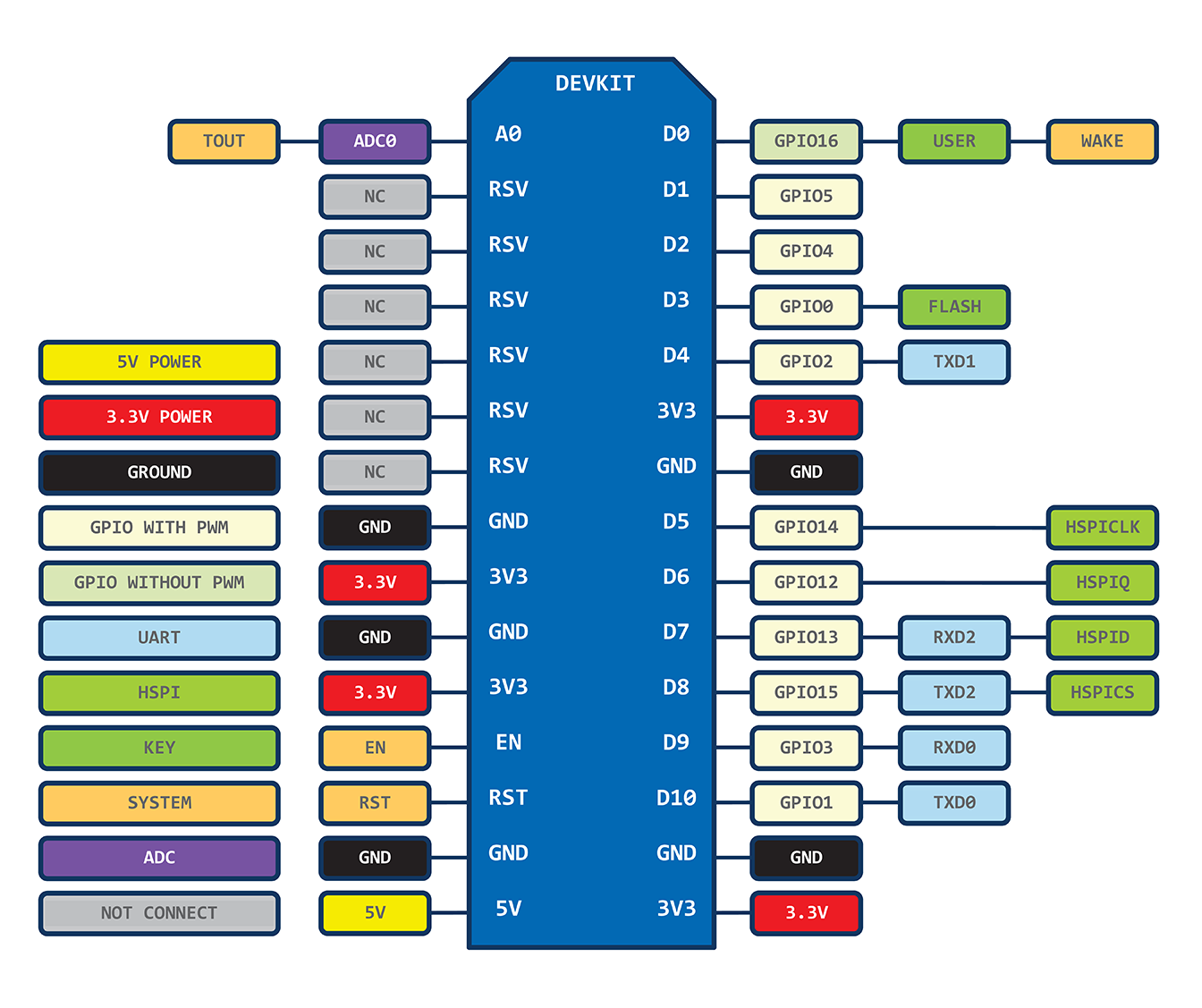
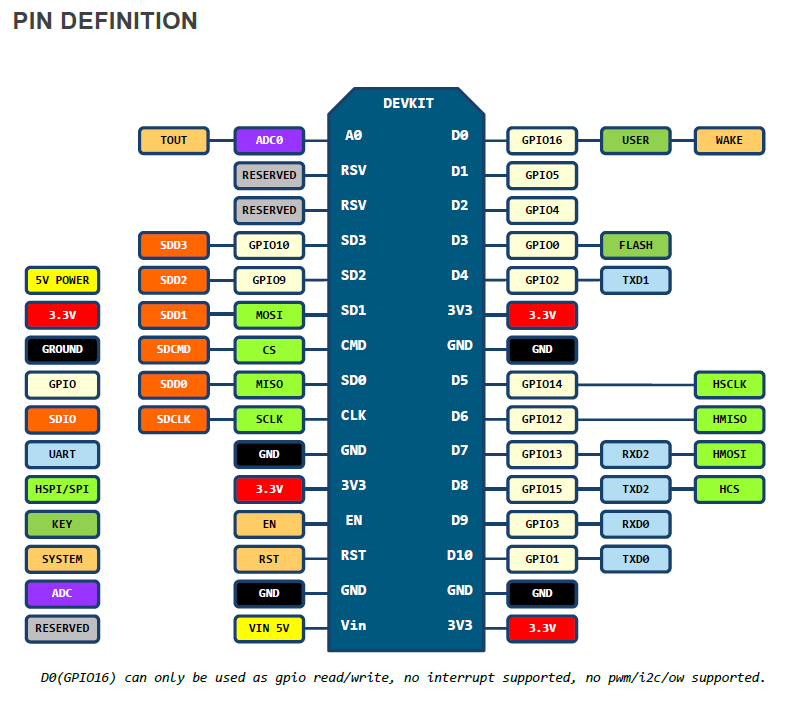
Devkit 0.9與1.0腳位定義有差異,主因是因為ESP-12E多了6支引腳


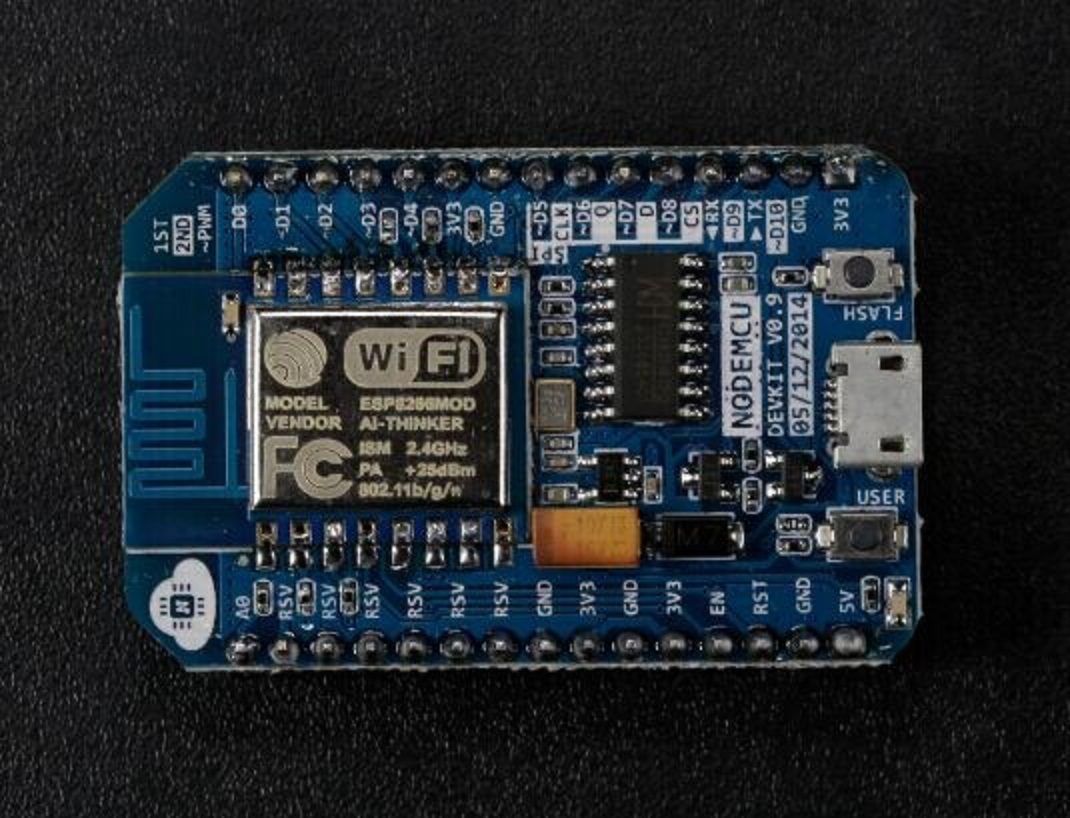
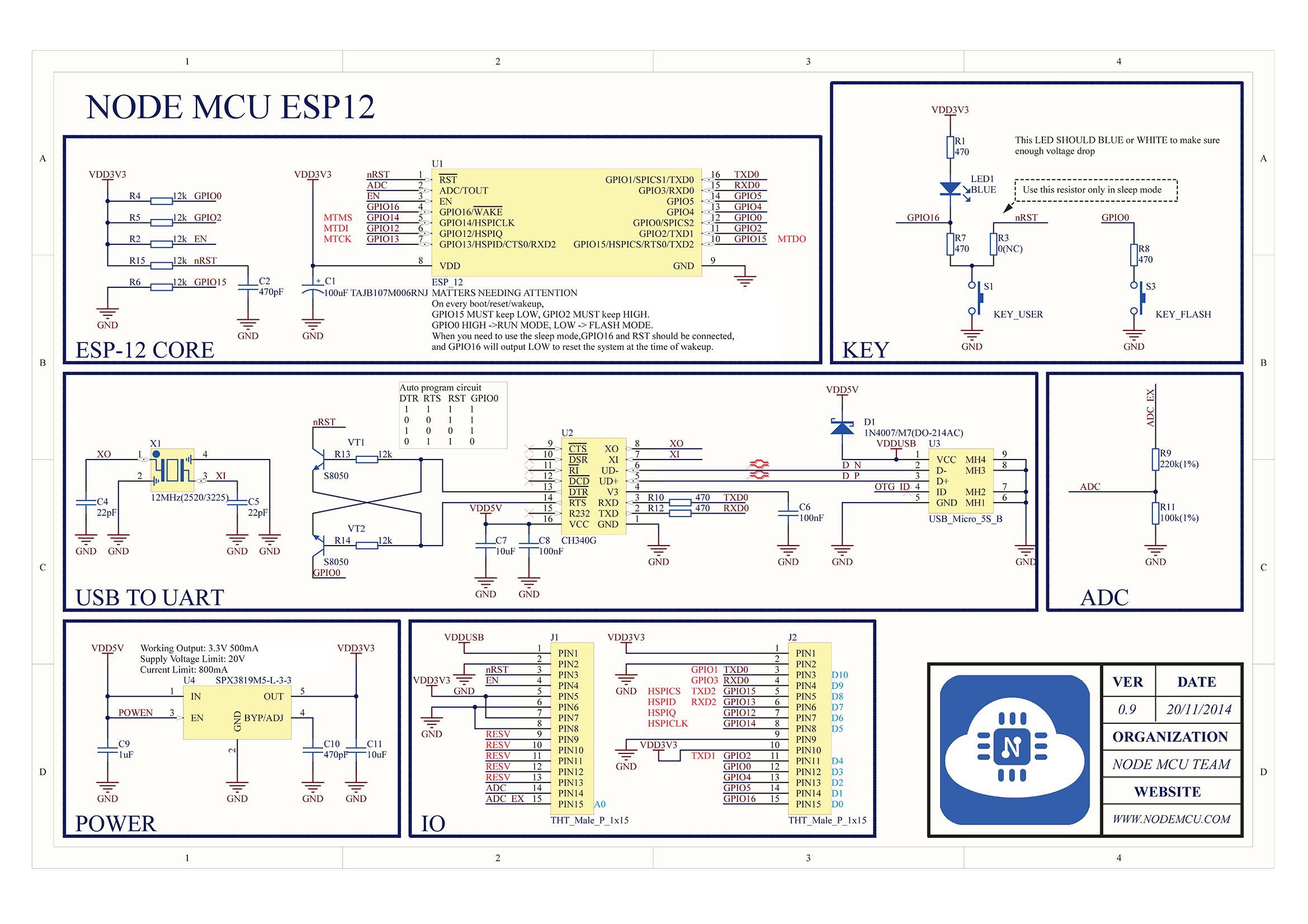
Devkit 0.9 : ESP-12 + CH340G
DEVKIT


SCH


Devkit 1.0 : ESP-12E + CP2102


https://raw.githubusercontent.com/nodemcu/nodemcu-devkit/master/Documents/NODEMCU_DEVKIT_SCH.png


node.key : --deprecated
node.led  : --deprecated
node.readvdd33 : --deprecated, moved to adc.readvdd33()


node.dsleep()

描述

进入睡眠模式,计时时间之后唤醒

语法

node.dsleep(us)

-注意: 如需使用此功能,需要将esp8266的PIN32(RST)和PIN8(XPD_DCDC)短接。


物聯網開放平台 - QQ物聯