請參考連結 : http://www.esp8266.com/wiki/doku.php?id=esp8266-test-boards
2015年8月30日 星期日


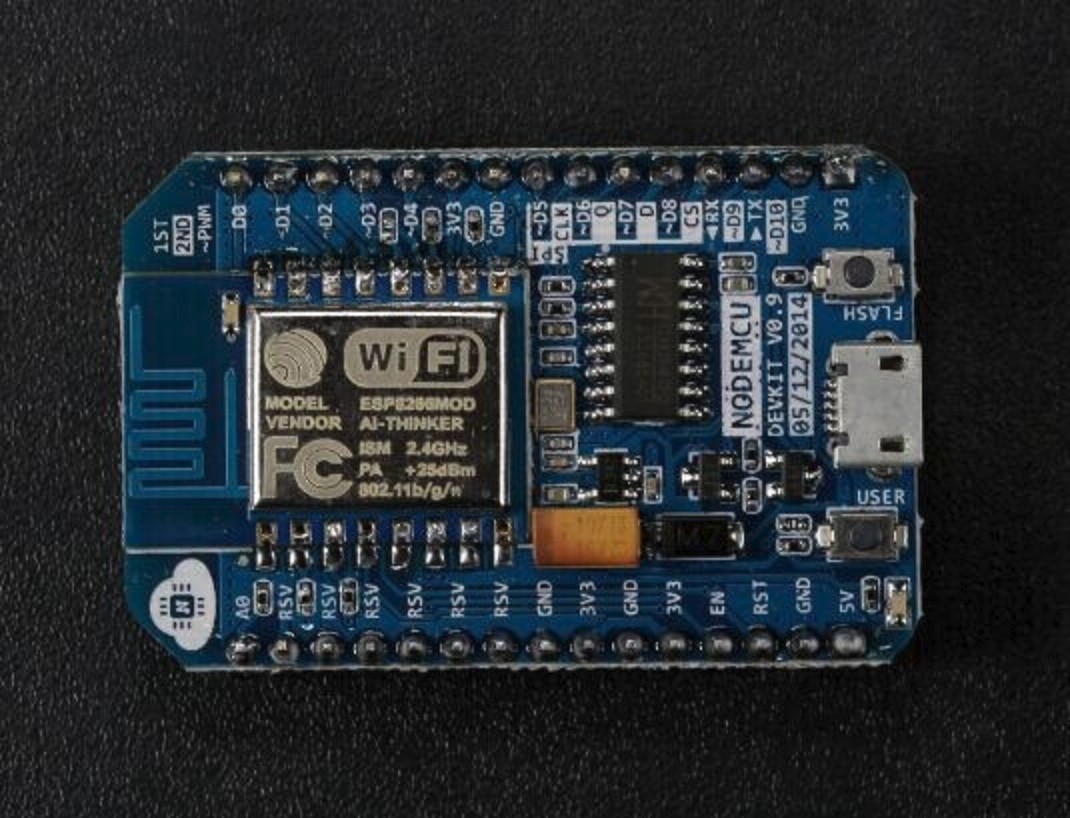
NodeMcu Devkit 0.9/1.0 開發版差異
資料來源 : NodeMCU GitHub
主要差異:
Devkit 0.9與1.0腳位定義有差異,主因是因為ESP-12E多了6支引腳
NodeMcu Devkit 1.0 = ESP-12E + CP2102
NodeMcu Devkit 0.9 = ESP-12 + CH340G
外觀比較:
NodeMcu Devkit 0.9
 NodeMcu Devkit 1.0
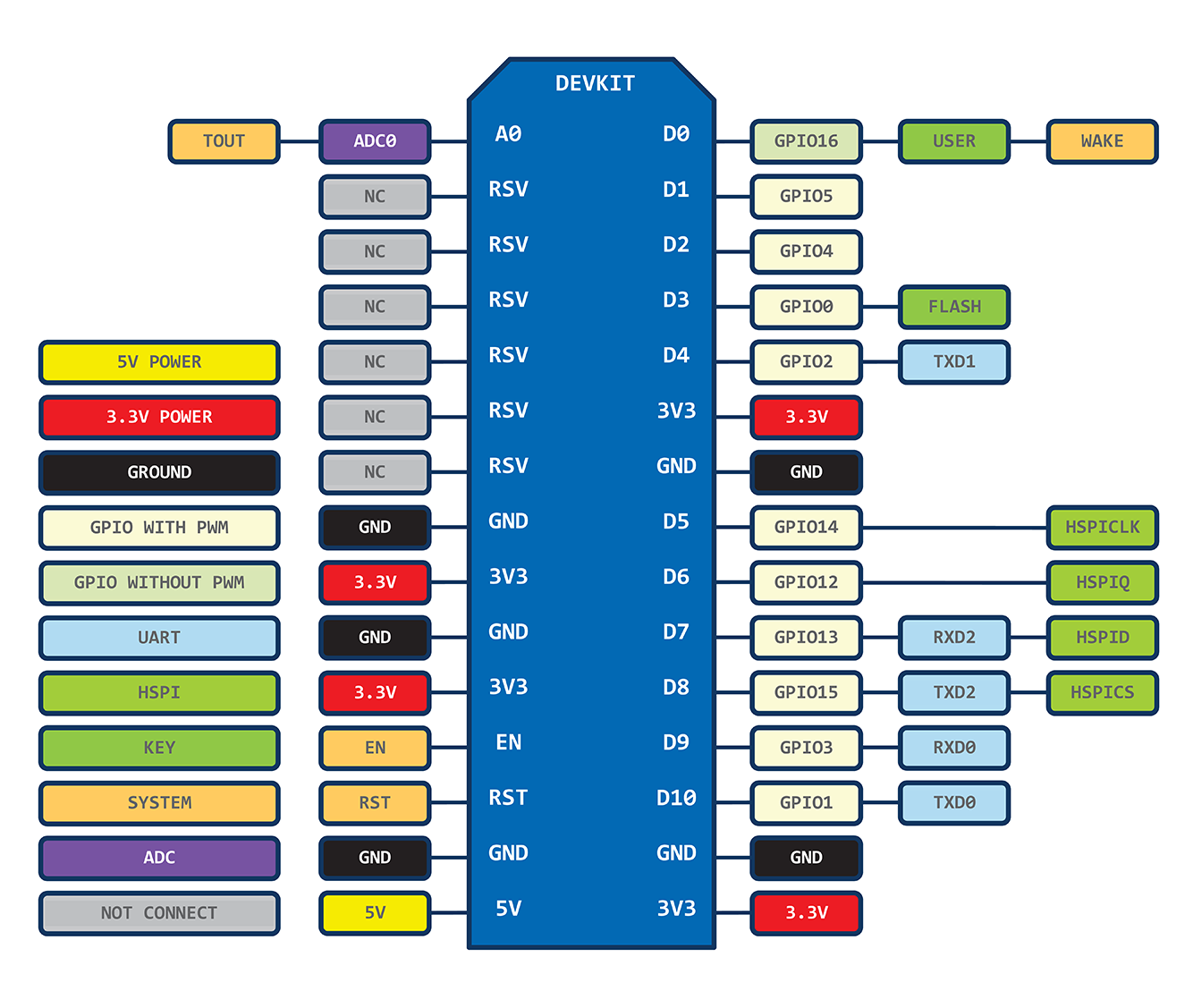
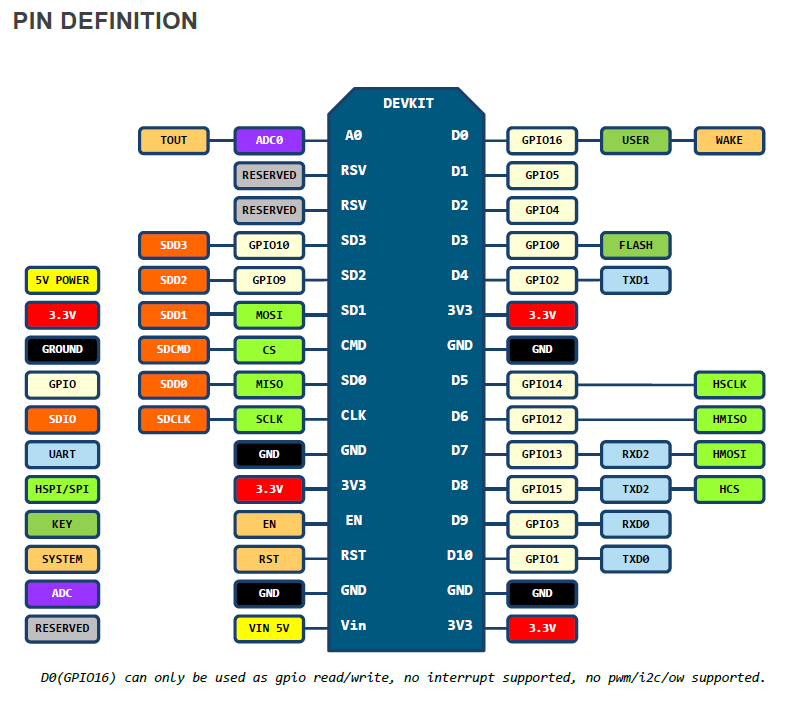
腳位比較
主要差異在於ESP-12E 多引出了6根腳,所以Devkit 1.0 也跟著引出這6根腳位NodeMcu Devkit 0.9
NodeMcu Devkit 1.0
2015年8月29日 星期六
Windows下用SSCOM學習ESP8266 AT Command
請預先準備載有AT Firmware的ESP8266開發板模組.
1.先將ESP8266模組,以USB to Serial (FT232/CP2102/CH340G/PL2303)連接至PC.....
2.在Windows下,使用SSCOM操控ESP8266 .(SSCOM英文版下載處)
3.執行SSCOM ,並做設定,如下圖紅線框

4.可如下圖紅框,輸入AT Command 進行練習

最新版本波特率为 115200,
支持 AT 指令改波特率。之前模块默认波特率可能為 9600(不同firmware來源,可能有不同預設)
AT+RST
OK
ets Jan 8 2013,rst cause:4, boot mode:(3,7)
wdt reset
load 0x40100000, len 612, room 16
tail 4
chksum 0x12
load 0x3ffe8000, len 788, room 4
tail 0
chksum 0x50
load 0x3ffe8314, len 264, room 8
tail 0
chksum 0x4a
csum 0x4a
2nd boot version : 1.1
SPI Speed : 40MHz
SPI Mode : DIO
SPI Flash Size : 32Mbit
jump to run user1
rlS
ready
AT+GMR
00200.9.4
OK
;;0018000902-AI03
;;0018 is AT Version
;;0902 is SDK Version
;;00200.9.4
;;0020 is AT Commnad Version
;;0.9.4 is SDK Version
註:因不同版本SDK,會有不同版本AT Instruct Set,所以做出的Firmware可能會有些許不同
ESP IoT SDK V1.3.0 AT v0.40 08.08.2015
ESP IoT SDK v1.0.0 AT v0.22
AT Command Set 可參考下面連結:
https://github.com/espressif/esp8266_at/wiki
https://room-15.github.io/blog/2015/03/26/esp8266-at-command-reference/
4A-ESP8266 AT Instruction Set EN v0.40
未完....
2015年8月27日 星期四


2015年8月6日 星期四
OBS 之 librtmp
Real Time Messaging Protocol (RTMP)
OBS 是實況直播軟體,可將視窗及聲音串流至網路直播平台,如Twitch,Youtube等.....
RTMP就是串流的傳輸協定,librtmp 是open source 的Library, OBS有利用librtmp封裝Video及Audio資料,經Encoding後,將他串流至RTMP Server......
關於librtmp的使用,可參照雷霄骅前輩的介紹:
2015年7月29日 星期三
Powershell下分析Diskpart.exe輸出資料
參考資料:
不同語系(locale) 的Diskpart.exe的輸出格式會有些許不同,下面Code是我在Windows 8.1中文版試過可行的,若要英文版請參考上面連結
輸出:
不同語系(locale) 的Diskpart.exe的輸出格式會有些許不同,下面Code是我在Windows 8.1中文版試過可行的,若要英文版請參考上面連結
Function GET-DISKPARTINFO()
{
[cmdletbinding]
# Build Script for LIST DISK in DISKPART

New-item -Name listdisk.txt -Itemtype file -force | out-null
add-content -path listdisk.txt "list disk"
$listdisk=(diskpart /s listdisk.txt)

# Get Total Disks outputted.
# Yes.  It's as simple as "Count the lines on the screen"

$totaldisk=$listdisk.count-8

# Step through each line that will contain disk information
for ($d=0;$d -lt $totaldisk;$d++)
{
# Pull the Partition size data and the DiskNumber

$size=$listdisk[8+$d].substring(25,9).replace(" ","")
$diskid=$listdisk[8+$d].substring(5,5).trim()

# Create a script to pull detail on the existing disk

new-item -Name detail.txt -ItemType file -force | out-null
add-content -Path detail.txt "select disk $diskid"
add-content -Path detail.txt "detail disk"

# Capture the output from Diskpart for the Detail

$Detail=(diskpart /s detail.txt)

# Parse the data for the partition

$Model=$detail[8]
$type=$detail[10].substring(9)
$DriveLetter=$detail[-1].substring(12,1) #(15,1)

# Grab the partition sizing data

$length=$size.length
$multiplier=$size.substring($length-2,2)
$intsize=$size.substring(0,$length-2)

# Convert the Partition "KB/MB/GB" to a real value
switch($multiplier)
    {
        KB { $mult=1KB }
        MB { $mult=1MB }
        GB { $mult=1GB }
    }

# Calculate the size of the Disk or Partition
$disktotal=([convert]::ToInt16($intsize,10))*$mult

# Return the Object back to the real world Neo
[pscustomobject]@{DiskNum=$diskid;Model=$model;Type=$type;DiskSize=$disktotal;DriveLetter=$DriveLetter}
}
}
輸出:
DiskNum     : 0
Model       : VMware, VMware Virtual S SCSI Disk Device
Type        :  SAS
DiskSize    : 64424509440
DriveLetter : C

DiskNum     : 1
Model       : USB FLASH DRIVE USB Device
Type        :  USB
DiskSize    : 4009754624
DriveLetter : E
訂閱:
意見 (Atom)